ElevatorInterface
Elevator Interface
Real Life Example
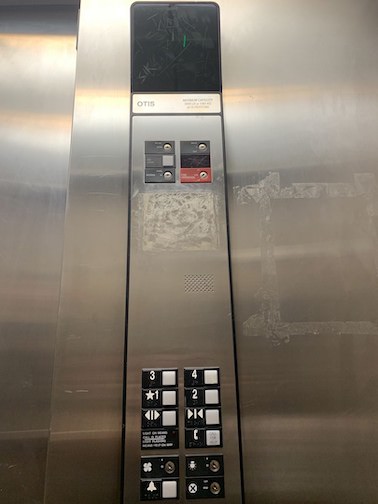
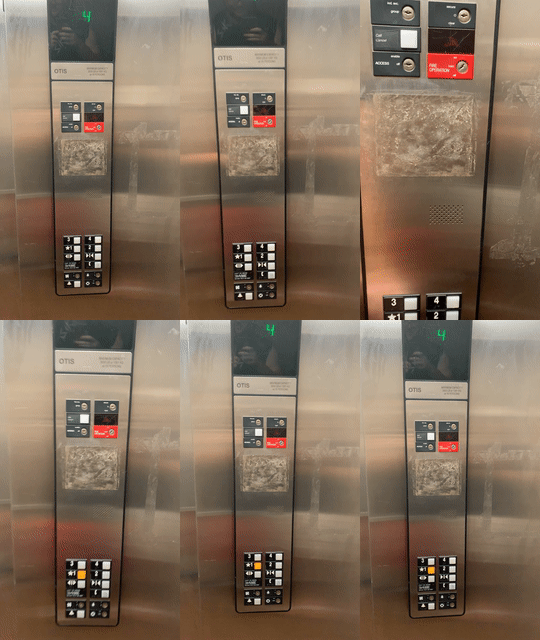
Issues with Design
- Alarm button looks like a hanging light button
- Lack of Audio when selection of any floor
Explanation of Issues
- This confusing image makes a user confused on the functionality of that specific button
- Without an audio cue, a user does not know if the button was properly selected. Especially if the user is blind
Common/Rare Use Cases
- Fast way to travel between floors in a building
- Allows for users in a wheelchair to travel up floors in a building
- Moving large loads/furniture up and down a building
Common Sequence of Actions
- Press outside button to call the elevator
- Walk into the elevator
- Select floor option by pressing a button
- Arrive at floor and leave elevator
Feedback to User with Current Design
- The grouping of the buttons and the black background makes it easy to see which label goes with what button
- The brail next to the button allows blind users to read what each button is for
- The screen allows person to understand what floor they are currently at
Common Errors Made with Design
- Get on the elevator traveling the wrong direction due to a lack of display on elevator traveling direction
Redesign
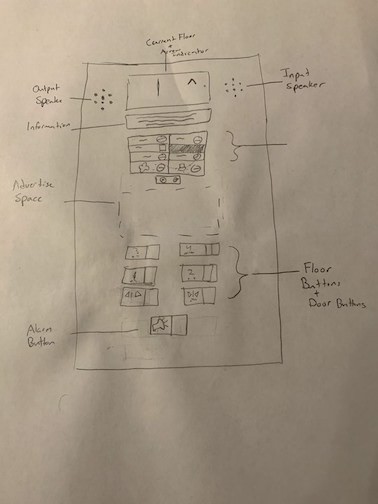
Touch Screen Design
- Screen Size: 12.1 x 20.2
- Link: Touch screen
Demonstration Instructions
- Open the link and sign in to Adobe XD
- Zoom out to see most of the screen
- Click the Touch Panel
- Click the Alarm button to hear alarm (Bottom Left)
- Click the ! for the maintenance and setting outside
- Takes you to a window to select Settings or maintenance that takes you to a code pad
- Click the back arrow and the back button to return to Panel Screen
- Click on Floor 6 and observe animations
- Click on Floor 3
- Back at main panel screen, click the up facing arrow
- Then click the bottom facing arrow to finish the Demonstration
Supports Disabilities
-
My design supports wheelchair access people. The buttons below the screen allow for people who cant reach the screen to be able to still easily navigate the elevator’s control panel
-
The button design are large to help users that have trouble reading small text
Extra Info on Display
- The companies name of where the elevator is located
- The current floor of the elevator
- An easy maintenance button and screen that is password protected
- Floor options with room to name floors and ease of use
- Alarm button to sound an alarm
Extra Unique Features (Imagination)
- Voice commands
Not demoed fully
-
A voice that says which floor is selected, Could not double up the animations but in live development it would say “Floor X selected”
-
Voice Commands: you can demo it on the panel page by holding space in the panel page and saying “Elevator go to floor 2”. Does not work 100% of the time at this time